Concrete Calculator
Pick the shape, type its size and get the cubic yards (or m³) of concrete to order, the number of premix bags and the weight.
Popular tools
- Asphalt CalculatorEnter the paved area and the compacted thickness to get the tons of asphalt to order, the volume and the truckloads.
- Gravel CalculatorEnter the area and depth, choose the stone, and get the volume, the weight in tons and the number of bags.
- Concrete Block CalculatorEnter the wall length and height and pick the block size to get the number of concrete blocks and courses.
How to use the Concrete Calculator
- Open “What are you pouring?” and choose the shape: Slab (patio, driveway, floor), Round slab or pad, Wall, Footing or grade beam, or Column or pier (round).
- Fill in the fields the form shows for that shape. A slab needs Length, Width, and Thickness. A round slab needs Diameter and Thickness. A wall needs Length, Height, and Thickness. A footing needs Length, Width, and Depth. A column needs Diameter and Height. Pick ft, in, yd, m, cm, or mm for each field. Take the thickness from your plans or local code.
- For several identical pieces, such as four piers, enter the count in “Number of identical pieces.”
- Open More options to change “Waste / extra (%)”, which starts at 5. You can also type a price per yd³ or m³ under “Price per unit of concrete (optional)” to get an estimated cost.
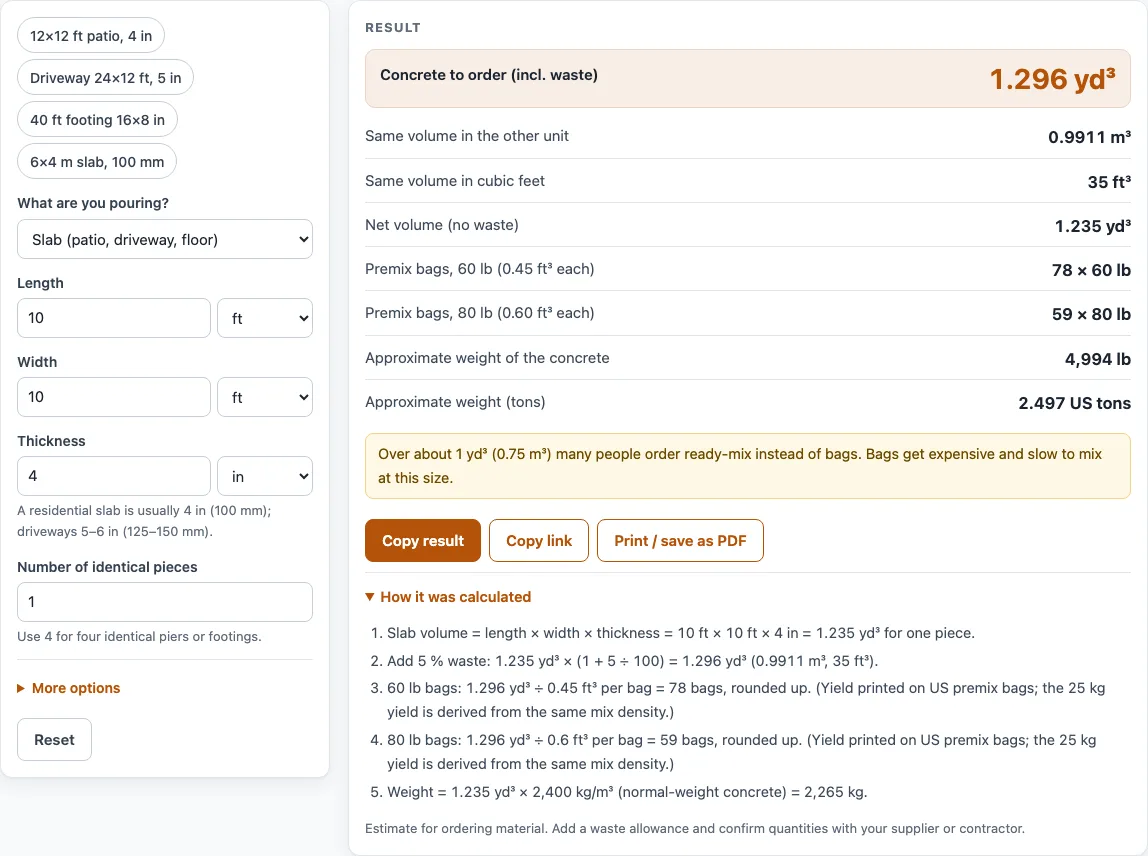
- Read the results. “Concrete to order (incl. waste)” is the amount to order. The net volume, bag counts, and weight appear below it.
- Open “How it was calculated” to see each step with your own numbers.
“Copy link” saves your inputs in a link, “Copy result” copies the result lines and the link, and “Print / save as PDF” prints the steps with the date. “Reset” restores the default values. The Examples buttons load common jobs.
How many yards of concrete do I need?
You need the volume of the space you are filling, in cubic yards (US) or cubic meters. Figuring concrete yardage, or figuring out concrete yardage, means finding that volume in cubic yards (CY), so this page also works as a concrete CY calculator. Ready-mix concrete is sold by the cubic yard or cubic meter, so the volume you calculate is the figure you give the supplier. One cubic yard equals 27 cubic feet, or 0.7646 m³. One cubic meter equals 1.308 yd³.
Add a waste allowance before you order. The help text suggests 5% to cover spillage and uneven sub-grade, and 10% on rough ground. The tool warns when the order passes about 1 yd³ (0.75 m³), because that is a lot of bags to mix by hand, so a ready-mix quote is worth comparing.
What is the formula for figuring concrete?
The concrete calculator formula is volume = length × width × thickness for a slab, wall, or footing. A round slab or column uses π × (diameter ÷ 2)² × height or thickness. Convert inches to feet by dividing by 12, then divide cubic feet by 27 to get cubic yards.
Take the default example, a 10 ft × 10 ft slab that is 4 in thick:
- Thickness: 4 in ÷ 12 = 0.333 ft.
- Volume: 10 × 10 × 0.333 = 33.3 ft³, which is 1.235 yd³.
- Add 5% waste: 1.235 × 1.05 = 1.296 yd³ (0.9911 m³, 35 ft³).
- Weight of the net volume: 1.235 yd³ is 0.944 m³, and at 2,400 kg/m³ that is about 2,265 kg. The tool shows it as 4,994 lb or 2.50 US tons for US units.
The 2,400 kg/m³ density is the EN 1991-1-1 Annex A value for normal-weight concrete (24 kN/m³). Real mixes vary, so confirm with your supplier.
How do I figure concrete for a square footage?
Multiply the square footage by the thickness in feet. For 400 sq ft at 4 in: 400 × 0.333 = 133.3 ft³, or 4.94 yd³ before waste. On this page, enter the area as Length with 1 ft as Width; the concrete slab calculator also has an “area known” mode, so it works directly as a concrete square footage calculator.
How many bags of concrete make a yard?
Premix bags are sold by yield, the cubic feet of concrete one bag makes. The tool uses 0.45 ft³ for 60 lb bags and 0.60 ft³ for 80 lb bags. Divide the order volume in cubic feet by the yield and round up. For the 35 ft³ example, that is 78 bags of 60 lb or 59 bags of 80 lb. Check the yield printed on your bag.
What about screed, base, and other mixes?
For a screed layer or self-leveling concrete, use the Slab shape with the layer thickness, then use the coverage on your product label for bags. For a crushed concrete base, use the same volume and convert it to tons with the cubic yards to tons calculator.
Worked examples
| Input | Result |
|---|---|
| Slab (patio, driveway, floor): 10 ft × 10 ft × 4 in | 1.296 yd³ (0.9911 m³); or 78 bags (60 lb) / 59 bags (80 lb) |
| Slab (patio, driveway, floor): 20 ft × 12 ft × 4 in | 3.111 yd³ (2.379 m³); or 187 bags (60 lb) / 140 bags (80 lb) |
| Footing or grade beam: 40 ft × 16 in × 8 in | 1.383 yd³ (1.057 m³); or 83 bags (60 lb) / 63 bags (80 lb) |
| Column or pier (round): 12 in × 8 ft (× 4) | 0.9774 yd³ (0.7473 m³); or 59 bags (60 lb) / 44 bags (80 lb) |
| Slab (patio, driveway, floor): 6 m × 4 m × 100 mm | 2.64 m³ (3.453 yd³); or 226 bags (25 kg) |
Calculated by the tool above with these values.
Frequently asked questions
Is the calculator free, and is anything I type uploaded?
Yes, the calculator is free and needs no sign-up. It runs entirely in your browser, and nothing you type is uploaded.
Can I use the results in commercial work such as quotes and bids?
Yes. You can use the quantities, steps, and printouts in any work, including estimates, quotes, bids, takeoffs, and material orders. No attribution is needed.
Does the result already include waste?
The line “Concrete to order (incl. waste)” includes the percentage you enter under More options. “Net volume (no waste)” shows the figure without it.
Why does the tool warn me about my slab thickness?
A slab thinner than the minimum shown in the warning is not normally recommended for concrete that carries foot or vehicle traffic. Check the thickness before you continue.
Why does the tool warn about my waste percentage?
A waste allowance above 30% is unusually high. Check the number you entered.
Can I enter metric and US units in the same calculation?
Each field has its own unit menu, and the tool converts all values before calculating. Results appear in the unit system of the first dimension you type: feet, inches, or yards give cubic yards and US tons, while meters, centimeters, or millimeters give m³ and tonnes.
Are the results accurate enough for an engineering design?
No. Results are estimates for planning and ordering. They are not engineering designs or code checks, and you should confirm quantities with your supplier or contractor.
Related tools
- Concrete slab calculator: use it when you want a slab-focused estimate for a patio, driveway, or floor.
- Concrete bag calculator: use it when you plan to mix small jobs from premix bags.
- Concrete footing calculator: use it for footings and grade beams.
- Concrete step calculator: use it to estimate concrete for steps.
- Sonotube calculator: use it when you pour round columns or piers in cardboard forms.
- Concrete weight calculator: use it to check the weight of a pour before hauling or delivery.
- Cubic yards to tons calculator: use it to convert a volume of crushed concrete or other fill into tons.
- Cement mix calculator: use it when you mix your own cement and sand.
- All calculators: use it to browse every tool on the site.
Sources
- QUIKRETE Concrete Mix (No. 1101) data sheet: bag yields 0.30 / 0.375 / 0.45 / 0.60 ft³
- EN 1991-1-1 (Eurocode 1), Annex A Table A.1: normal-weight concrete 24 kN/m³, +1 kN/m³ when reinforced
- NIST SP 811: 1 ft = 0.3048 m, 1 lb = 0.45359237 kg