Concrete Footing Calculator
Choose a strip, pad or pier footing, enter its size and get the concrete to order, bags and the footing rebar.
The concrete footing calculator estimates how much concrete a footing needs and converts that volume into cubic yards, cubic meters, premix bags and, if you enter a price, an estimated concrete cost. It handles three footing types: continuous (strip) footings under walls, spread (pad) footings under posts or columns, and round pier footings. For strip footings it can also estimate the length and weight of longitudinal rebar. The tool is free and runs entirely in your browser, with no sign-up.
It is a quantity tool, not a design tool. You enter the footing dimensions you already have, and it works out the volume. That makes it useful as a footing calculator for concrete when you are planning a deck, a block wall or a shed and need an order size before calling a supplier.
How to use the Concrete Footing Calculator
- Choose the Footing type: Continuous (strip) footing, Spread (pad) footings, or Round pier footings.
- For a strip footing, enter the Total footing length, then the Footing width and Footing depth (thickness). Total length is the centerline length of all strip footings added together.
- For pad footings, enter the Number of pads, then the Pad length, Pad width and Pad depth (thickness).
- For round piers, enter the Number of piers, then the Pier diameter and Pier depth.
- Pick the unit next to each measurement. Each box accepts its own unit, and results follow the unit system of the first dimension you type.
- Open More options and set the Waste allowance (%).
- Optional: type your supplier’s price in Price per yd³ or m³ to get an estimated concrete cost.
- Optional, strip only: enter the Longitudinal bars count and choose a Bar size. Enter 0 to skip the rebar estimate.
- Read the result rows, then open How it was calculated to check each step with your own numbers.
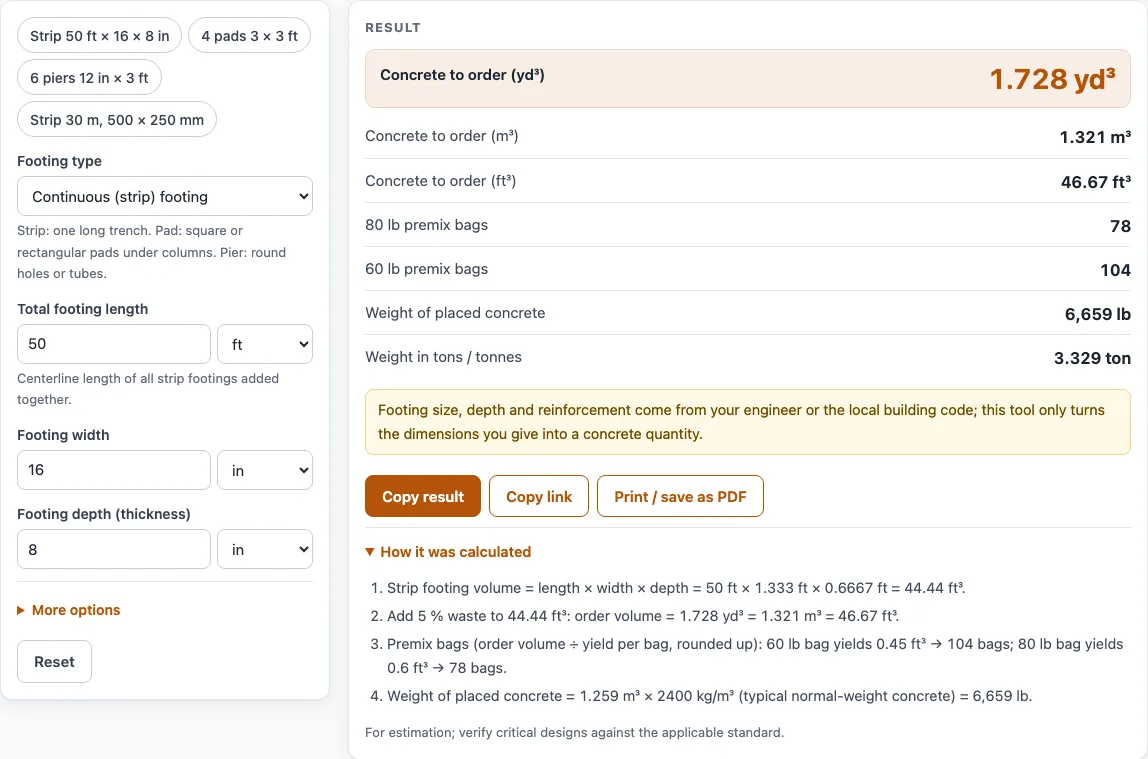
To see a worked case first, click an example button above the form. Reset restores the default values. Copy result copies the result lines with a link, Copy link copies a page address that holds every input so the same calculation reopens, and Print / save as PDF prints the inputs, results, steps and date.
The tool finds the volume of each footing shape, adds waste, then converts the result into orderable units. For a strip footing, volume = length × width × depth. For pads, volume = number of pads × length × width × depth. For piers, volume = number × π × (diameter ÷ 2)² × depth. Waste is then added: order volume = volume × (1 + waste %). Premix bags equal the order volume divided by the yield of one bag, rounded up.
Take the default strip footing of 50 ft long, 16 in wide and 8 in deep. That is 50 × 1.333 × 0.6667 = 44.44 ft³. Adding 5 % gives 46.67 ft³, or 1.728 yd³. One 80 lb bag yields 0.6 ft³, so the order needs 78 bags. There are 27 ft³ in a cubic yard and 1 m³ = 1.308 yd³. The default strip footing weighs about 6,659 lb (3.33 US tons) as placed concrete.
To use it as a concrete foundation calculator, treat each part of the foundation separately. Enter a continuous footing for the wall footings, pad footings for posts, and round piers for drilled holes, then add the order volumes together. Foundation walls and floor slabs are not footings, so use the Wall and Slab shapes of the concrete calculator for them. If you type a price, the tool multiplies it by the order volume to give an estimated cost for the concrete only.
Is the calculator free, and is anything I type uploaded?
Yes, the calculator is free, needs no sign-up and runs entirely in your browser. Nothing you type is uploaded.
Can I use the results in commercial work such as quotes and bids?
Yes. Results, calculation steps and printouts may be used in any work, including estimates, quotes, bids, takeoffs and material orders, and no attribution is needed. Before you put a figure in a bid, check the parts the tool cannot know. Footing size and reinforcement must come from the engineer’s design or local code. Densities (EN 1991-1-1) and bag yields (QUIKRETE data sheet) are reference values, so confirm them with your supplier.
Worked examples
| Input | Result |
|---|---|
| Strip footing 50 ft long, 16 in wide, 8 in deep | 1.728 yd³ (1.321 m³) with waste, 78 × 80 lb bags |
| Strip footing 120 ft long, 20 in wide, 10 in deep | 6.481 yd³ (4.955 m³) with waste, 292 × 80 lb bags |
| 9 pad footings, 36 in × 36 in × 12 in deep | 3.15 yd³ (2.408 m³) with waste, 142 × 80 lb bags |
| 8 round piers, 12 in diameter, 48 in deep | 0.9774 yd³ (0.7473 m³) with waste, 44 × 80 lb bags |
| Strip footing 30 m long, 500 mm wide, 250 mm deep | 3.938 m³ (5.15 yd³) with waste, 337 × 25 kg bags |
Calculated by the tool above with these values.
Frequently asked questions
Who decides the footing size and rebar layout?
The engineer’s design or the local building code does. The calculator only computes quantities for the sizes you type, so enter the dimensions and bar count you have been given.
Why does the rebar estimate look too low?
The rebar estimate is the straight length of each bar only. Laps, corner bars, stirrups and cover are not included, so add those yourself when you order steel.
When should I switch from premix bags to ready-mix?
When the bag count gets high. The tool warns when the number of bags is more than a person should mix by hand. At that volume, compare a ready-mix delivery quote. For example, the 120 ft strip footing needs 292 bags of 80 lb premix.
Can I enter measurements in metric?
Yes. Every value can be typed in metric or US units, and the tool converts them before calculating. If your first dimension is in meters, cm or mm, results appear in m³ and tonnes. If it is in feet, inches or yards, results appear in yd³, ft³ and US tons.
Does the estimated cost include everything?
No. It multiplies the ordered volume by the price you type. Rebar, forms, delivery and labour are not part of that figure, so add them separately.
Related tools
- Concrete calculator: Use it for the overall concrete volume of a project that is not only footings.
- Concrete slab calculator: Use it when you need the volume of a flat slab, such as a garage or patio floor.
- Concrete bag calculator: Use it when you already know the volume and need the number of premix bags.
- Concrete step calculator: Use it to estimate concrete for steps and stair treads.
- Sonotube calculator: Use it to size concrete for round forms, such as those used for piers.
- Concrete weight calculator: Use it to find how heavy a concrete volume is before you move or deliver it.
- Cement mix calculator: Use it to work out the cement and sand proportions for a mix.
- All calculators: Use it to browse every tool on the site.
Sources
- QUIKRETE Concrete Mix (No. 1101) data sheet: bag yields 0.30 / 0.375 / 0.45 / 0.60 ft³
- EN 1991-1-1 (Eurocode 1), Annex A Table A.1: normal-weight concrete 24 kN/m³, +1 kN/m³ when reinforced
- Caltrans Bridge Design Details ch. 13: ASTM A615 bar diameters and weights