Concrete Step Calculator
Enter the number of steps, rise, tread depth and width to get the concrete for the whole flight, with a side view.
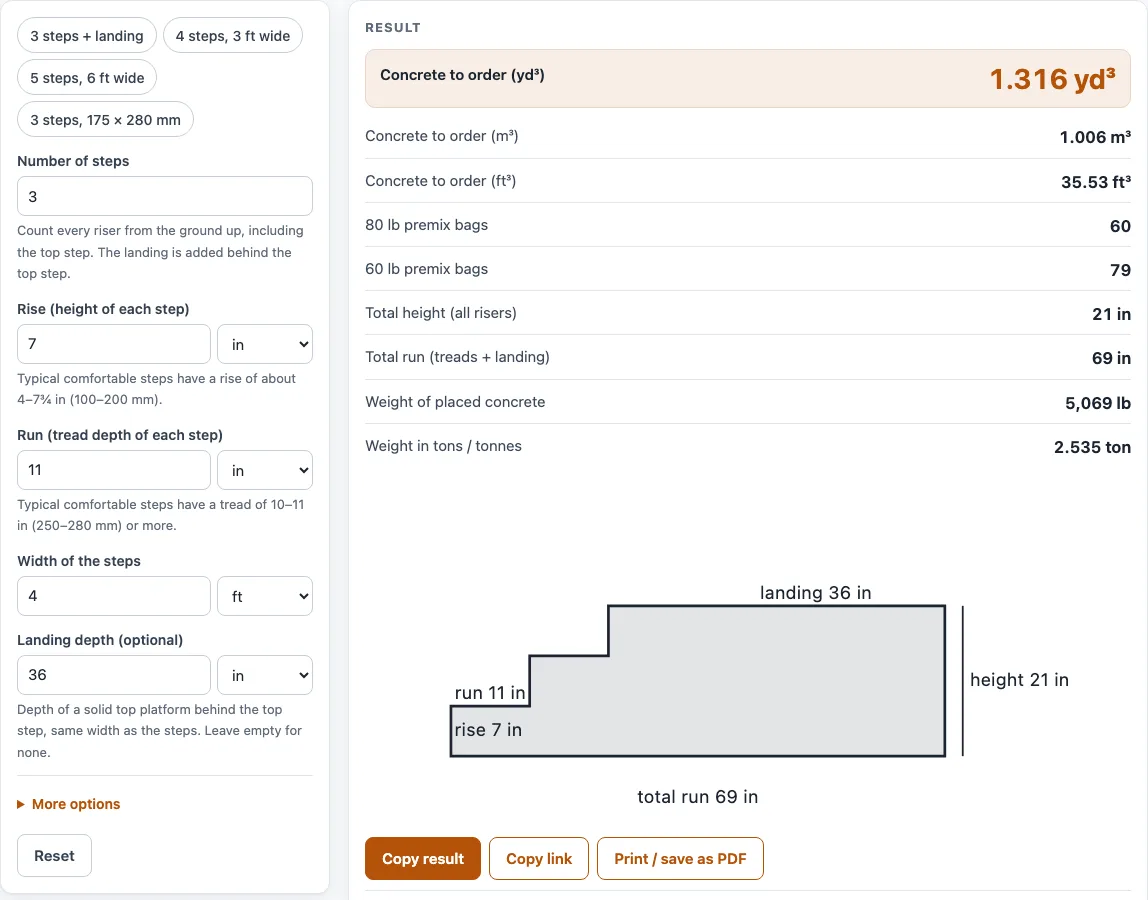
How to use the concrete steps calculator
- Enter the Number of steps. Count every riser from the ground up, including the top step. The default is 3.
- Enter the Rise (height of each step) and choose its unit: in, mm, cm, ft, or m. The unit of the rise decides whether the results are US or metric.
- Enter the Run (tread depth of each step) and choose its unit.
- Enter the Width of the steps and choose its unit: ft, in, m, cm, mm, or yd.
- Optional: enter a Landing depth (optional), a solid platform behind the top step with the same width as the steps. It starts at 36 in; clear the box for no landing.
- Open More options to set the Waste allowance (%), which starts at 5, and an optional Price per yd³ or m³.
- Read the results, then open How it was calculated to see each formula with your own numbers.
The example buttons above the form load a 3-step porch with a landing, 4 steps 3 ft wide, 5 steps 6 ft wide, and a metric set. Reset restores the defaults. Copy link copies an address that holds your inputs. Copy result copies the result lines and the link. Print / save as PDF prints inputs, results, steps, and the date.
How do you calculate concrete for steps?
A solid flight of n steps is a stack of blocks: the first step is one rise high, the second two rises, and so on up to n rises. The volume is width × rise × run × n(n+1) ÷ 2. A landing adds landing depth × width × n × rise, because the tool makes the platform solid from the ground up to the top step.
Take the default: 3 steps with a 7 in rise, an 11 in run, a 4 ft width, and a 36 in landing.
- Steps: 4 ft × 0.5833 ft × 0.9167 ft × 6 = 12.83 ft³.
- Landing: 3 ft × 4 ft × 1.75 ft = 21 ft³.
- Add 5% waste to 33.83 ft³: 35.53 ft³, or 1.316 yd³ (1.006 m³).
- Bags: 79 bags of 60 lb or 60 bags of 80 lb.
- Total height is 21 in and total run is 69 in. The placed concrete weighs about 5,069 lb (2.53 US tons).
Without the landing, the same steps need 13.47 ft³ (0.499 yd³) with waste, or 30 bags of 60 lb or 23 bags of 80 lb.
Are the numbers exact?
No. The sketch and the formula treat the steps as perfect blocks. Densities (EN 1991-1-1) and bag yields (QUIKRETE data sheet) are reference values, and real material varies, so confirm the figure with your supplier before ordering. The results are planning estimates, not engineering designs or code checks. Results appear in US units when the rise is in in or ft, and in metric units when it is in mm, cm, or m.
Is the calculator free, and is anything I type uploaded?
Yes, the calculator is free, runs entirely in your browser, and needs no sign-up. Nothing you type is uploaded. Your inputs are kept in the page address, which is how Copy link reopens the same calculation.
Can I use the results in commercial work such as quotes and bids?
Yes. Results, quantities, steps, and printouts may be used in any work, including estimates, quotes, bids, takeoffs, and material orders. No attribution is needed.
Worked examples
| Input | Result |
|---|---|
| 3 steps, rise 7 in, run 11 in, 4 ft wide, landing 36 in deep | 1.316 yd³ (1.006 m³) with waste, 60 × 80 lb bags |
| 4 steps, rise 7 in, run 10 in, 3 ft wide | 0.5671 yd³ (0.4336 m³) with waste, 26 × 80 lb bags |
| 5 steps, rise 7 in, run 11 in, 6 ft wide, landing 4 ft deep | 4.594 yd³ (3.512 m³) with waste, 207 × 80 lb bags |
| 3 steps, rise 175 mm, run 280 mm, 1.2 m wide, landing 900 mm deep | 0.9658 m³ (1.263 yd³) with waste, 83 × 25 kg bags |
| 6 steps, rise 170 mm, run 270 mm, 1 m wide | 1.012 m³ (1.324 yd³) with waste, 87 × 25 kg bags |
Calculated by the tool above with these values.
Frequently asked questions
What rise and run are typical for steps?
For stairs in one- and two-family homes, the International Residential Code (R311.7.5) allows a riser of at most 7¾ in (197 mm) and asks for a tread of at least 10 in (254 mm). Local codes and other building types differ, so check your local rules. The tool warns when the rise is outside 4–7¾ in or the tread is under 10 in.
Why does the tool ask me to count the top step?
Each riser is one step, so the number of steps equals the number of risers from the ground up. The landing is added behind the top step, so do not count it as an extra step.
What does the shallow tread warning mean?
It appears when the run you entered is below about 10 in (250 mm). Check the tread depth measurement. A shallow tread is less comfortable to use, and it changes the volume the tool calculates.
Does the calculator allow for hollow or gravel-filled steps?
No. The tool treats the steps as solid concrete from the ground up. A filled or hollow stair uses less concrete, so you may be able to order less, but confirm this with your contractor before you change the quantity.
Why does the tool suggest ready-mix when the bag count is high?
When the bag count is above about 150, the tool warns that mixing that many bags by hand is a lot of work. At that volume, compare a ready-mix delivery quote.
Related tools
- Concrete calculator: use it for the volume of concrete in a shape other than steps.
- Concrete slab calculator: use it when you need concrete for a flat slab.
- Concrete bag calculator: use it to plan how many premix bags to buy for a job.
- Concrete footing calculator: use it to estimate concrete for footings.
- Sonotube calculator: use it to size concrete for round cardboard form tubes.
- Concrete weight calculator: use it to find the weight of a concrete volume for delivery or lifting planning.
- Cement mix calculator: use it to work out cement and sand quantities for a mix.
- All calculators: use it to browse every calculator on this site.
Sources
- QUIKRETE Concrete Mix (No. 1101) data sheet: bag yields 0.30 / 0.375 / 0.45 / 0.60 ft³
- EN 1991-1-1 (Eurocode 1), Annex A Table A.1: normal-weight concrete 24 kN/m³, +1 kN/m³ when reinforced
- International Residential Code: R311.7.5 stair risers and treads, R404.4 retaining walls (sections cited only)