Cubic Yards to Tons Calculator
Convert a volume of gravel, sand, soil or other material to tons (or tons to cubic yards) using a published loose density.
The cubic yards to tons calculator converts a volume in cubic yards (yd³) into a weight in US tons or metric tonnes. It multiplies the volume by the bulk density of the material you choose, such as gravel, sand, topsoil or concrete. The tool also works in reverse, turning tons back into cubic yards, and it accepts metric units such as cubic meters.
It runs entirely in your browser, is free, and needs no sign-up. Enter a volume, pick a material, and the result shows the weight in tons, tonnes, pounds and kilograms, along with the density used and the steps behind it. Use it to estimate how much material to order before you call a supplier.
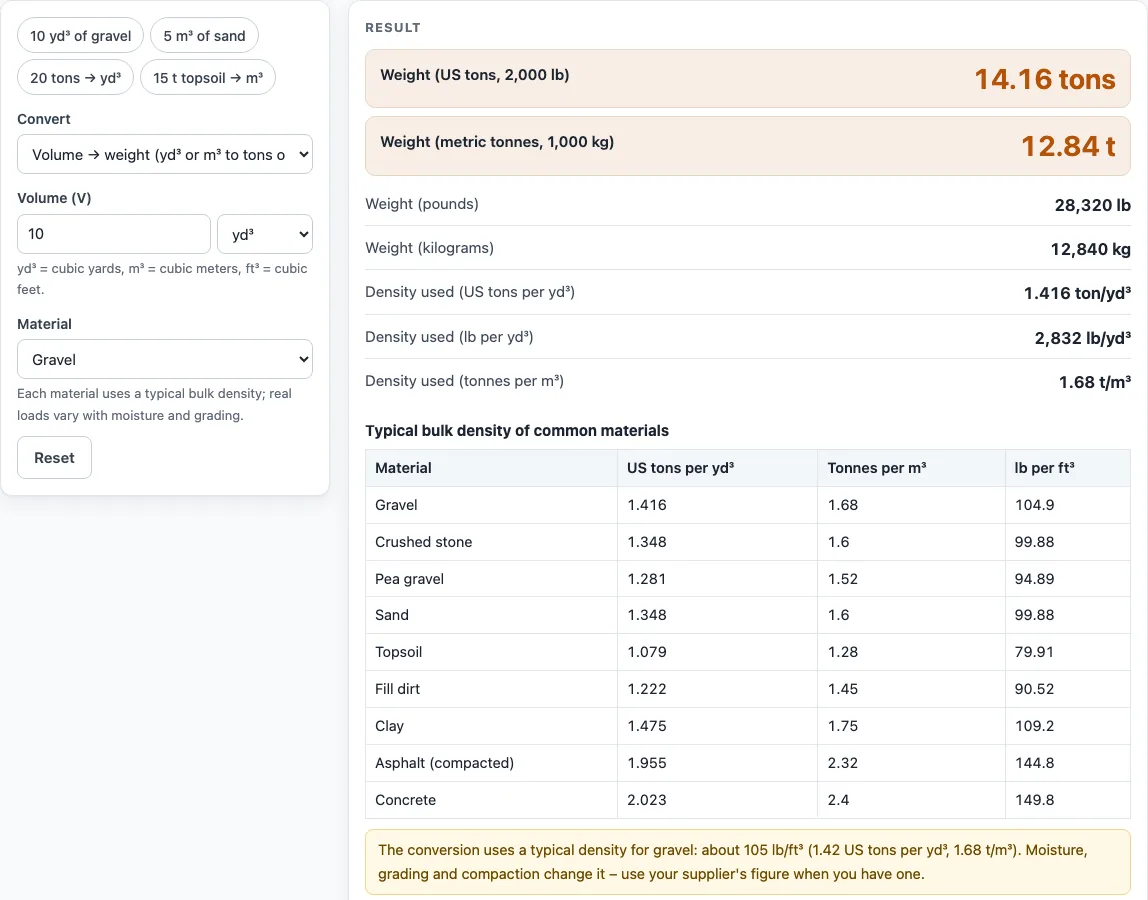
How to use the Cubic yards to tons calculator
- Under Convert, choose “Volume → weight (yd³ or m³ to tons or tonnes)”.
- In Volume (V), type your amount and select the unit: yd³, m³ or ft³.
- In Material, choose the option closest to your load, such as Gravel, Sand, Topsoil or Concrete.
- If your material is not in the list, such as rip rap, choose “Custom density”. Then type the figure in Bulk density, using a unit such as lb/yd³ or ton/yd³. Use your supplier’s number if you have one.
- Read the Weight (US tons, 2,000 lb) row. For metric results, read the Weight (metric tonnes, 1,000 kg) row. To go from tons to yards, choose “Weight → volume” under Convert and type the weight in Weight (W) instead.
- Check the Density used row and any warning shown above the result.
Click one of the example buttons above the form, such as “10 yd³ of gravel”, to see a finished calculation. The “How it was calculated” section under the result shows each step with your own numbers. “Copy result” copies the result lines with a link, and “Copy link” copies a page address that reopens your exact inputs. “Print / save as PDF” prints the inputs, results, calculation steps and date. “Reset” restores the default values. A table of the densities used for every listed material appears under the result.
How do you convert cubic yards to tons?
To convert cubic yards to tons, multiply the volume in cubic yards by the material’s density in tons per cubic yard. To go the other way, divide the tons by that density to get cubic yards. Density is the weight of one cubic yard of a material, so the material you choose changes the answer.
The formula is:
Tons = cubic yards × density (tons per cubic yard)
The tool’s default example shows the steps:
- Find the density. Loose dry gravel weighs about 2,545 lb per cubic yard (Caterpillar’s 1,510 kg/m³). Divide by 2,000 lb per US ton to get 1.273 tons per cubic yard.
- Multiply the volume by the density: 10 yd³ × 1.273 tons/yd³ = 12.73 tons.
- For metric results, convert the volume first. 10 yd³ equals 7.6455 m³. Multiply by 1.51 t/m³ to get about 11.54 tonnes.
Keep the units consistent. A US ton is 2,000 lb, or about 907 kg, while a metric tonne is 1,000 kg. The two differ by about 10%, so mixing them up will throw off an order.
How many tons are in a cubic yard of gravel?
A cubic yard of loose dry gravel weighs about 1.27 US tons, or about 2,545 pounds. The tool uses Caterpillar’s loose density for dry gravel, 1,510 kg/m³. Real gravel varies with moisture and grading (Caterpillar lists pit-run gravel at 1,930 kg/m³), so treat this figure as a planning estimate.
Other materials weigh different amounts per cubic yard. The tool uses about 1.20 tons for dry loose sand, 0.80 tons for topsoil (both Caterpillar loose figures) and 2.02 tons for concrete (2,400 kg/m³, EN 1991-1-1). Topsoil is lighter than gravel, so 10 yd³ of topsoil weighs about 8.0 tons, compared with 12.73 tons of gravel.
Yard to ton conversion and ton to yard conversion
A yard to ton conversion always needs a density, because a cubic yard of one material weighs more than a cubic yard of another. The ton to yard conversion works the same way in reverse. For the conversion of tons to cubic yards, divide the weight by the density. For example, 20 US tons of crushed stone at about 1.348 tons per cubic yard is about 14.8 cubic yards. If you searched for cu yards to tons or how to convert cy to tons, note that cy and cu yards both mean cubic yards, so use the yd³ unit in Volume (V).
Worked examples
| Input | Result |
|---|---|
| 10 yd³ of gravel | 12.73 tons (11.54 t) |
| 5 m³ of sand | 7.1 t (7.826 tons) |
| 20 ton of crushed stone | 14.83 yd³ (11.34 m³) |
| 15 t of topsoil | 15.79 m³ (20.65 yd³) |
| 3 yd³ of concrete | 6.068 tons (5.505 t) |
Calculated by the tool above with these values.
Frequently asked questions
Is the calculator free, and is anything I type uploaded?
Yes, the calculator is free and needs no sign-up. It runs entirely in your browser, and nothing you type is uploaded.
Can I use the results in commercial work such as quotes and bids?
Yes. Quantities, steps and printouts may be used in any work, including estimates, quotes, bids, takeoffs and material orders. No attribution is needed.
Can I convert tons to cubic yards with this tool?
Yes. Under Convert, choose “Weight → volume (tons or tonnes to yd³ or m³)”. Enter the weight in ton, t, lb or kg, then pick the material. The results show the volume in cubic yards, cubic meters and cubic feet.
What does the density warning mean?
The tool shows this note whenever it uses a listed density for your material, and shows the value it used. With Custom density, a separate warning appears if the density is outside 300–5,000 kg/m³, which often means the number or unit you typed is wrong.
What does the “very large quantity” warning mean?
It appears when the amount is more than 100,000 yd³ (or, for a weight, more than 100,000 tonnes). It is a prompt to check the number and its unit, since a slip such as a wrong unit can change the result a great deal.
Related tools
- Gravel calculator: use it when you need to plan how much gravel to order for an area.
- Dirt calculator: use it to estimate the amount of dirt or fill for a project.
- Asphalt calculator: use it to estimate asphalt quantities for a paving job.
- Concrete calculator: use it to estimate concrete volumes for a pour.
- Concrete slab calculator: use it to work out how much concrete a slab needs.
- Concrete bag calculator: use it to see how many bags of concrete a small project requires.
- Cubic yard calculator: use it first to work out how many cubic yards an area needs.
- All calculators: use it to browse every tool on the site.
Sources
- Caterpillar, Material Density Tables to Help Estimate Earthwork Volumes: loose densities of gravel, sand, crushed stone, topsoil, loam and clay
- Virginia DOT IIM-LD-158: asphalt application rate based on 110 lb per square yard per inch
- EN 1991-1-1 (Eurocode 1), Annex A Table A.1: normal-weight concrete 24 kN/m³, +1 kN/m³ when reinforced