Cut and Fill Calculator
Type cut and fill depths on a grid, or areas and average depths, to get excavation, fill and the earthwork balance.
The cut and fill calculator estimates how much soil you must dig out (cut) and how much you must add (fill) to change the shape of a piece of ground. It works as a simple excavation calculator for lots and building pads. You enter depths at grid points, or one area and average depth for cut and for fill, and it returns the cut, the fill, the net, and whether you must import or export soil, with the loose haul volume.
The tool runs entirely in your browser. It is free, needs no sign-up, and nothing you type is uploaded. Spacing can be in feet, yards or meters, and depths in feet, inches, meters or centimeters. Results use the unit system of your spacing (or, in the area method, your cut area), so feet give cubic yards and meters give cubic meters. A table lists every volume in both units.
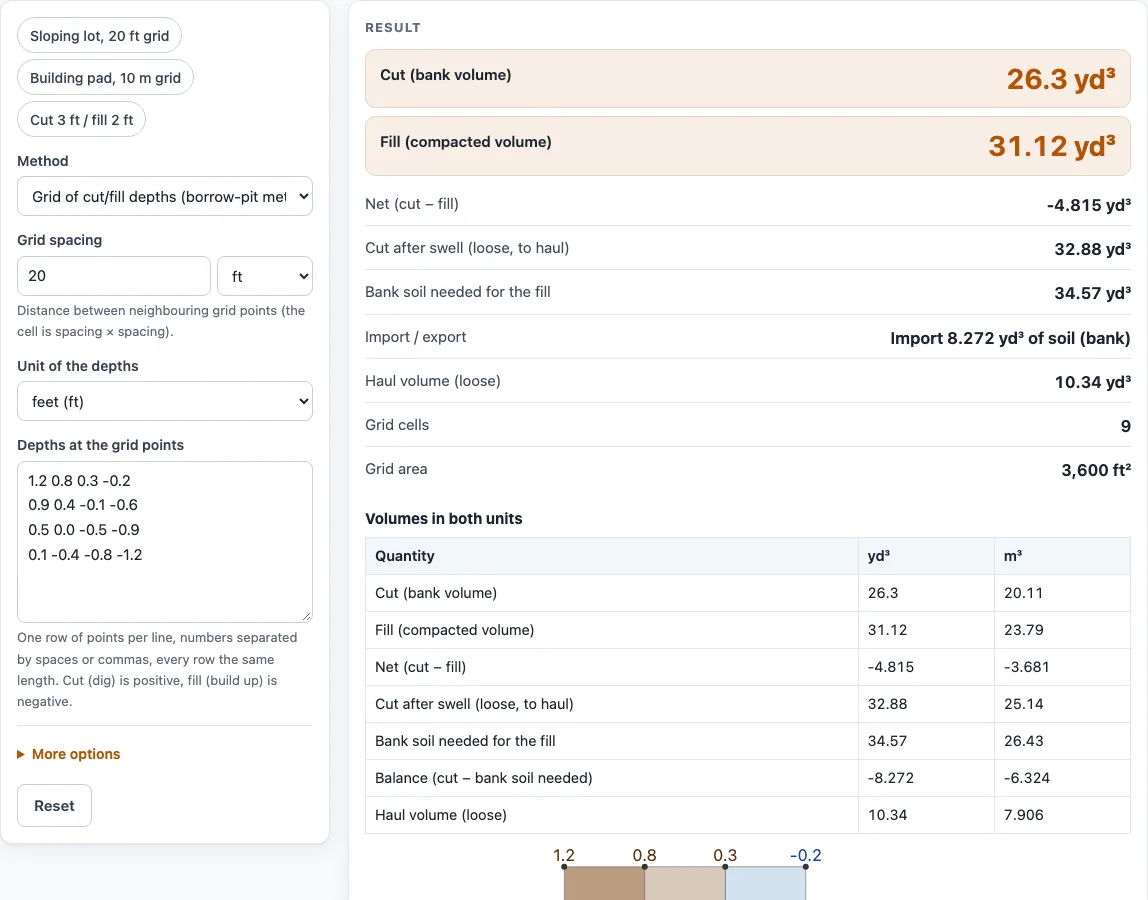
How to use the cut and fill calculator
- Choose a Method. Pick “Grid of cut/fill depths (borrow-pit method)” when you have depths measured at several points. Pick “Area × average depth” when you know one area and one average depth for the cut and one for the fill.
- For the grid method, set Grid spacing and its unit (ft, yd or m). This is the distance between neighboring grid points.
- Set Unit of the depths to feet, inches, meters, or centimeters.
- Type the depths into Depths at the grid points, one row per line. Separate the numbers with spaces or commas, and keep every row the same length. Enter cut as positive numbers and fill as negative numbers.
- For the area method, enter Cut area and Average cut depth, then Fill area and Average fill depth. Areas can be in ft², yd², m², acres, or hectares.
- Open More options and check Swell of excavated soil (%) and Shrinkage of fill when compacted (%). The defaults are 25 % and 10 %. Change them to match your soil.
- Read the results, then open “How it was calculated” to see each step with your numbers.
The example buttons above the form load ready-made inputs: Sloping lot, 20 ft grid, Building pad, 10 m grid, and Cut 3 ft / fill 2 ft. “Copy link” copies a page address that holds all your inputs, so the same calculation reopens later. “Print / save as PDF” prints the inputs, results, calculation steps and date. “Reset” restores the example values.
How does the grid method work for cut and fill volume?
The grid method measures the ground at the corners of equal square cells and gives each cell a volume. Each cell’s volume is its area multiplied by the average of its four corner depths, with cut counted as positive and fill as negative.
Measuring on a grid lets you cover uneven ground. Points laid out as a grid of four rows and four columns make nine cells, and the cell volumes are added to give the site totals. A 20 ft spacing gives cells of 20 ft × 20 ft, or 400 ft² each.
What formula splits a cell that has both cut and fill?
A cell often has some corners above the planned level and some below it. Averaging those corners together would cancel the cut against the fill and hide the true quantities. The standard borrow-pit transition formula avoids this:
- cut = A × (sum of the positive corners)² ÷ (4 × sum of the absolute values of all corners)
- fill = A × (sum of the absolute values of the negative corners)² ÷ (4 × sum of the absolute values of all corners)
Here A is the cell area. Cut minus fill always equals the cell’s area multiplied by its average depth, so no soil is lost in the split.
What are swell and shrinkage in cut and fill calculations?
Swell is the increase in volume when undisturbed soil is dug and loosened. Shrinkage is the decrease in volume when that soil is compacted into fill. The calculator applies both after the in-place volumes are found.
Using the tool’s default example, the cut of 26.3 yd³ swells by 25 % to 32.88 yd³ of loose soil in the truck. The fill of 31.12 yd³ with 10 % shrinkage needs 34.57 yd³ of bank soil, found by dividing by 0.90. The cut is 8.272 yd³ short of that requirement, so the site must import 8.272 yd³ of bank soil. The haul figure is that import volume increased by the swell percentage, about 10.34 yd³ loose.
Net (cut − fill) is a quick balance check. In the default example it is −4.815 yd³, meaning the site needs more fill than it digs. The swell and shrinkage percentages change the haul and import figures, not the in-place cut and fill.
Worked examples
| Input | Result |
|---|---|
| 9 grid cells, spacing 20 ft | cut 26.3 yd³, fill 31.12 yd³ |
| 4 grid cells, spacing 10 ft | cut 7.407 yd³, fill 0 yd³ |
| 4 grid cells, spacing 10 m | cut 21.25 m³, fill 21.25 m³ |
| Cut 9000 ft² × 3 ft | cut 1,000 yd³, fill 333.3 yd³ |
| Cut 1 ha × 0.5 m | cut 5,000 m³, fill 600 m³ |
Calculated by the tool above with these values.
Frequently asked questions
Is the cut and fill calculator free, and is anything I type uploaded?
Yes, the calculator is free, needs no sign-up, and runs entirely in your browser. Nothing you type is uploaded.
Can I use the results in commercial work such as quotes and bids?
Yes. Results, quantities, steps and printouts may be used in any work, including estimates, quotes, bids, takeoffs and material orders. No attribution is needed.
Are the results accurate enough for an engineering design?
No. The results are estimates for planning and ordering, not engineering designs or code checks. Verify critical designs against the applicable standard.
Can I use it for a basement or other excavation?
Yes, as an excavation calculator for dirt or soil. Enter the area and average depth in the area method, or measured depths in the grid method. It gives bank volume and loose haul volume, but it does not model shoring, benching, or slopes of the excavation walls.
Which units will the results show?
Results use the unit system of your grid spacing, or of your cut area in the area method. Feet and yards give cubic yards, and meters give cubic meters. The “Volumes in both units” table shows every figure in yd³ and m³. The tool does not give weights.
Why does the tool warn me about a depth or swell value?
The tool warns when a depth is over 30 m (100 ft), which is unusual, so check your depth unit. It also warns when all depths are zero, when cut and fill are both zero, or when swell is above 60 %, which is very high for soil. A warning does not stop the calculation.
Related tools
- Slope percentage calculator: use it to work out the rise over run of a slope before you plan the grades.
- Roof pitch calculator: use it to convert a roof’s rise and run into pitch and slope.
- Concrete slab calculator: use it to size a slab once the excavated base is ready.
- Concrete footing calculator: use it to estimate concrete for footings dug into the excavation.
- Concrete step calculator: use it to plan steps built into a sloped site.
- All calculators: use it to browse every calculator on the site.
Sources
- Standard soil conversion table (common earth: bank 1.00, loose 1.25, compacted 0.90), e.g. Prof. A. S. Hanna’s earthwork notes