Dirt Calculator
Enter the area and depth to fill and get the cubic yards (or m³) of dirt to order, its weight and the number of truckloads.
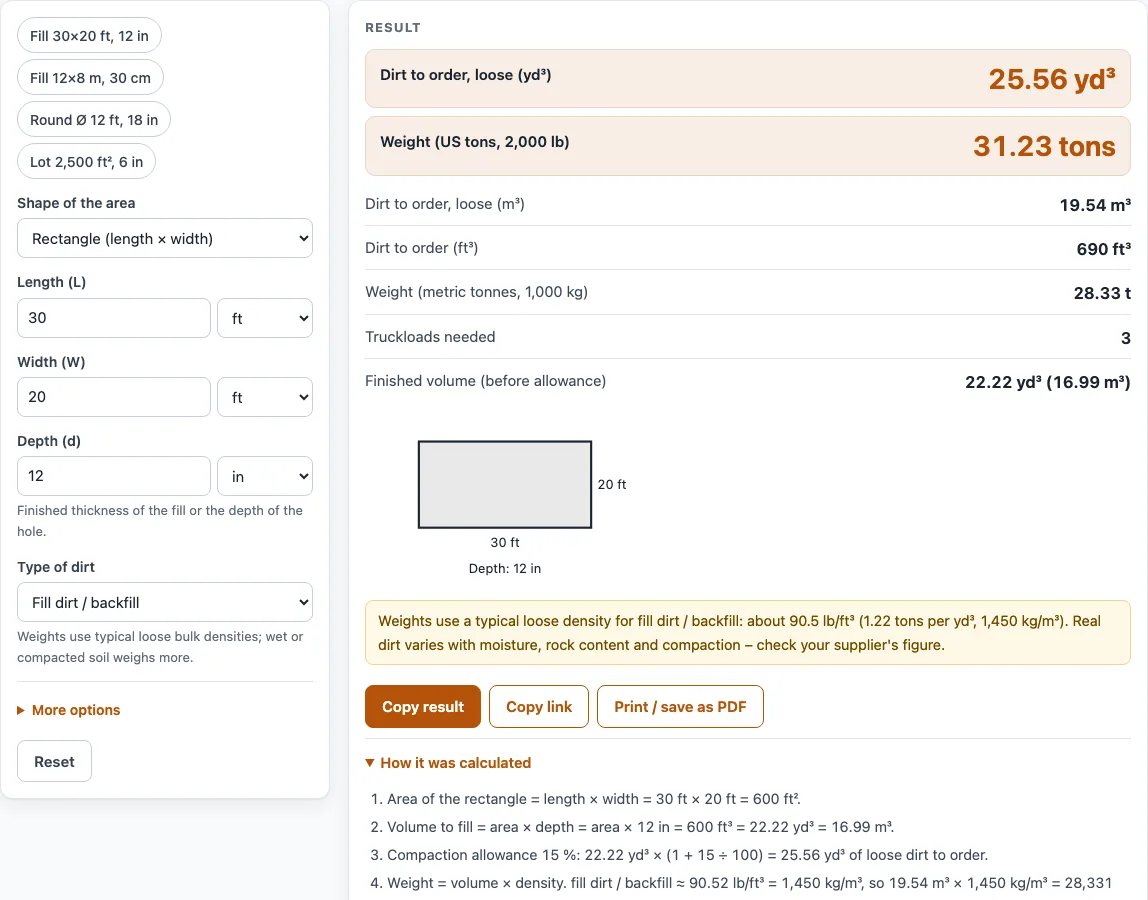
How to use the Dirt calculator
- Choose the Shape of the area: Rectangle (length × width), Circle (diameter), Triangle (base × height), or Area already known.
- Enter the size using the fields that match your shape: Length (L) and Width (W), Diameter (D), Base (b) and Height (h), or Area (A) in ft², yd², m², acres or hectares. Pick the unit for each value.
- Enter the Depth (d), which is the finished thickness of the fill or the depth of the hole.
- Select the Type of dirt: Fill dirt / backfill, Topsoil, Clay or Sand.
- Open More options to set the Compaction allowance (%). The default is 15. Enter 0 for none. You can also set the Truck capacity in yd³ or m³. Ask your hauler for the real figure, because 10 yd³ is only a starting value.
- Read the results: Dirt to order (loose), weight, truckloads needed and finished volume. Check any warning shown above them.
Not sure where to start? The example buttons above the form fill in sample jobs, such as Fill 30×20 ft, 12 in, and Reset returns to the default values.
Under the result, Copy result copies the result lines with a link, and Copy link copies a page address that holds every input, so the same calculation reopens later. Print / save as PDF prints the inputs, results, calculation steps and the date.
How to estimate fill dirt
To estimate fill dirt, multiply the area by the depth, convert the result to cubic yards, and then add an allowance for settling. Work in one unit system first, usually feet, because 1 cubic yard equals 27 cubic feet.
For a rectangle 30 ft by 20 ft and 12 inches (1 ft) deep, the area is 600 ft² and the volume is 600 ft³. Dividing by 27 gives 22.22 yd³ of finished fill. A circle uses area = π × (diameter ÷ 2)², and a triangle uses area = ½ × base × height, before the same depth multiplication.
How many yards of dirt do I need?
You need the finished volume plus extra loose dirt to cover settling. Loose fill sinks when it is placed and compacted, so the tool multiplies the finished volume by (1 + allowance ÷ 100). The default 39 % comes from the standard soil conversion table used in earthmoving courses (Prof. A. S. Hanna; U.S. Marine Corps estimating tables): common earth that occupies 1.00 yd³ loose shrinks to 0.72 yd³ compacted, so 1 compacted yd³ needs 1.39 loose yd³. With it, 22.22 yd³ becomes 30.89 yd³ to order.
Truckloads are found by dividing the loose volume by the truck capacity and rounding up. In the example, 30.89 ÷ 10 = 3.09, so you need 4 loads, because a partial load still has to be delivered as a full truck. Soils differ, so adjust the allowance to your soil report or your supplier’s advice.
How much does a yard of dirt weigh?
A loose cubic yard of fill dirt weighs about 1.05 US tons, using Caterpillar’s loose density for loam (earth), 1,250 kg/m³. Clay is heavier, at 1,660 kg/m³ (about 1.40 US tons per yd³), and topsoil is lighter, at 950 kg/m³ (about 0.80 US tons per yd³).
Weight equals volume multiplied by density. In the tool’s example, 23.62 m³ of fill at 1,250 kg/m³ gives 29,520 kg, or 32.54 US tons. Wet or compacted soil weighs more than these loose values, so confirm the figure with your supplier before you order.
What does the compaction allowance do?
The compaction allowance adds loose dirt to cover settling, so that the finished hole or bed is filled to the depth you entered. It is a percentage added on top of the finished volume. Setting it to 0 gives you the exact finished volume, which is useful only if you have a separate plan for settling.
Worked examples
| Input | Result |
|---|---|
| 30 ft × 20 ft, 12 in deep, fill dirt / backfill | 30.89 yd³ (23.62 m³), 32.54 tons, 4 truckload(s) |
| 12 m × 8 m, 0.3 m deep, fill dirt / backfill | 33.12 m³ (43.32 yd³), 41.4 t, 5 truckload(s) |
| Ø 12 ft, 18 in deep, topsoil | 6.912 yd³ (5.284 m³), 5.534 tons, 1 truckload(s) |
| 2,500 ft², 6 in deep, clay | 55.56 yd³ (42.48 m³), 77.72 tons, 6 truckload(s) |
| ½ × 15 ft × 10 ft, 8 in deep, sand | 1.852 yd³ (1.416 m³), 2.216 tons, 1 truckload(s) |
Calculated by the tool above with these values.
Frequently asked questions
Is the calculator free, and is anything I type uploaded?
Yes, the calculator is free, needs no sign-up, and runs entirely in your browser. Nothing you type is uploaded.
Can I use the results in commercial work such as quotes and bids?
Yes. Results, steps and printouts may be used in any work, including estimates, quotes, bids, takeoffs and material orders, and no attribution is needed. Each result still reads as an estimate, so add a waste allowance and confirm quantities with your supplier or contractor.
What compaction allowance should I use?
The default is 39 %, the loose-to-compacted factor for common earth in the standard soil conversion table. Use your soil report or supplier’s figure if you have one, and enter 0 if you do not want any extra. If the tool warns that your allowance is very high, check the number you typed.
Can I enter measurements in metric units?
Yes. Every value can be typed in metric or US units, and the tool converts them before calculating. Results appear in cubic yards, cubic feet and US tons when your first dimension is in feet, inches or yards. They appear in m³ and tonnes when your first dimension is in meters, centimeters or millimeters.
What if my area is not a simple rectangle, circle or triangle?
Choose Area already known and type the area in ft², yd², m², acres or hectares. Use this option when you have measured an irregular shape yourself, or when you have split a larger site into simple shapes and added their areas together.
Why does the tool warn that my depth is more than 10 ft?
A depth over 10 ft (3 m) triggers a warning, because it often means the depth was entered in the wrong unit. Check that the depth field uses the unit you intended, such as inches for a 12 in fill.
Does the tool work out the weight of the dirt?
Yes. It estimates the weight from the volume and Caterpillar’s loose density for the type of dirt you select. The result is a planning figure, not an engineering design or code check.
Related tools
- Dump truck capacity calculator: use this when you want the yards and tons one truck load carries and how many loads you need.
- Gravel calculator: use this when you need a base layer of crushed stone rather than soil or fill.
- Asphalt calculator: use this when you are estimating material for a paved driveway or path.
- Cubic yards to tons calculator: use this when you already have a volume in cubic yards and need the weight in tons.
- Concrete calculator: use this when you are estimating concrete rather than dirt or soil.
- Concrete slab calculator: use this when you are planning a concrete slab and need its volume.
- Concrete bag calculator: use this when you plan to mix concrete from bags.
- All calculators: use this when you want to browse every tool on the site.
Sources
- Caterpillar, Material Density Tables to Help Estimate Earthwork Volumes: loose densities of gravel, sand, crushed stone, topsoil, loam and clay
- Standard soil conversion table (common earth: bank 1.00, loose 1.25, compacted 0.90), e.g. Prof. A. S. Hanna’s earthwork notes