Gravel Calculator
Enter the area and depth, choose the stone, and get the volume, the weight in tons and the number of bags.
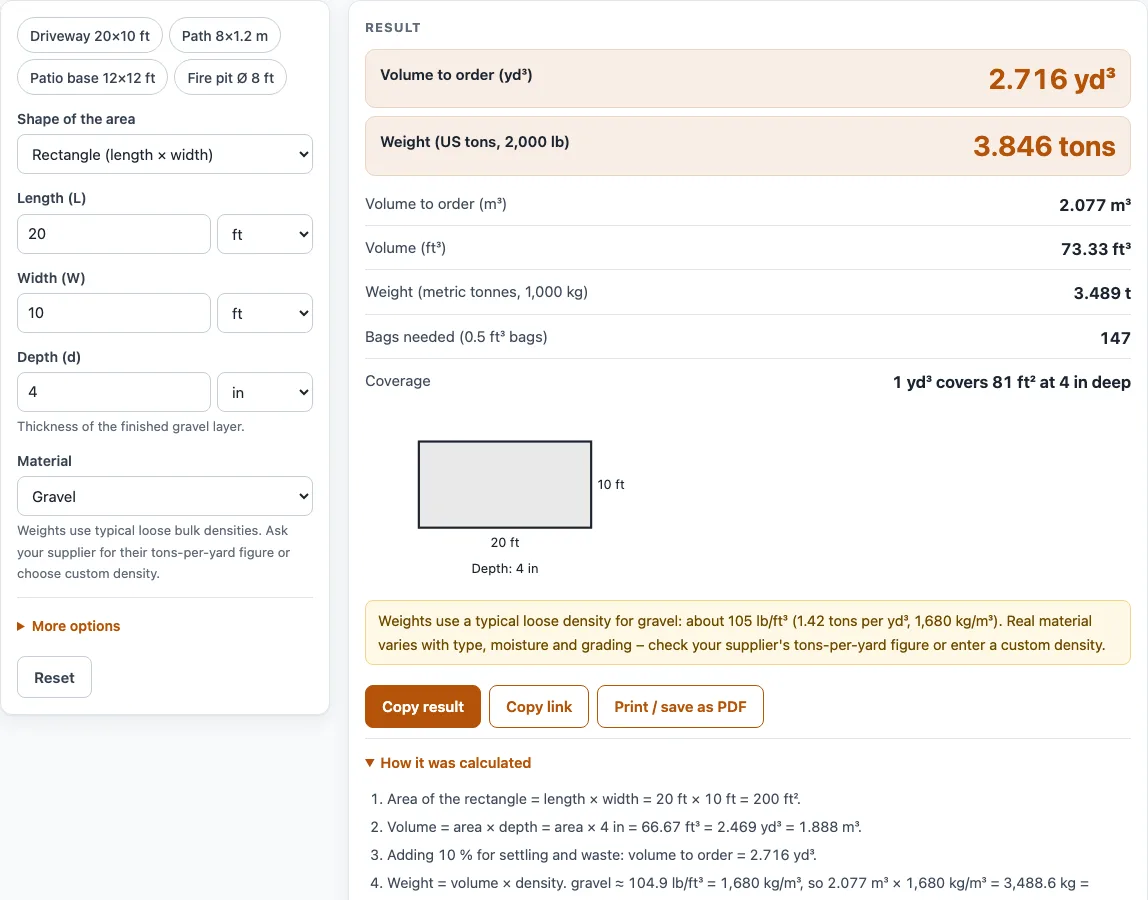
How to use the Gravel calculator
- Choose the Shape of the area: Rectangle (length × width), Circle (diameter), Triangle (base × height), or Area already known.
- Fill in the boxes for your shape: Length (L) and Width (W), Diameter (D), or Base (b) and Height (h), each with a unit (ft, in, yd, m, cm or mm). For Area already known, type Area (A) in ft², yd², m², acre or ha.
- Enter the Depth (d) of the finished layer, not the depth of the pile.
- Choose a Material: Gravel, Crushed stone, Pea gravel, River rock / landscape rock, Sand or Custom density. For Custom density, type a Bulk density and pick its unit. Your supplier’s tons-per-yard figure is the best value.
- Open More options to change Extra for settling and waste (%), which defaults to 10. Enter 0 for the exact volume. You can also type a Price (optional) and set Price is per to US ton, metric tonne, cubic yard or cubic meter.
- Read the results, then open How it was calculated to check each step.
The example buttons above the form (Driveway 20×10 ft, Path 8×1.2 m, Patio base 12×12 ft, Fire pit Ø 8 ft) load a complete calculation you can change. Reset restores the defaults. Copy link copies a page address that holds every input. Print / save as PDF prints your inputs, results, steps and the date.
How much gravel do I need?
Calculating yards of gravel comes down to one step: multiply the area by the depth to get the volume. A rectangle’s area is length × width, a circle’s is π × (diameter ÷ 2)², and a triangle’s is ½ × base × height. Keep every measurement in the same unit before you multiply, or convert them first.
For a 20 ft × 10 ft area at 4 in deep, the area is 200 ft² and the depth is one-third of a foot, so the volume is 66.67 ft³, or 2.469 yd³. One cubic yard is 27 cubic feet, so cubic yards are the usual unit for ordering. As a check, one cubic yard covers 81 ft² at 4 in deep, 108 ft² at 3 in and 162 ft² at 2 in.
How many tons of gravel are in a yard?
Loose dry gravel is about 1.27 US tons per cubic yard. The tool uses Caterpillar’s loose density for dry gravel, 1,510 kg/m³, which is about 94.3 lb/ft³. Weight equals volume × bulk density, and 27 ft³ × 94.3 lb/ft³ is about 2,545 lb, or 1.27 US tons (a US ton is 2,000 lb).
The other materials use Caterpillar’s loose figures too: crushed stone 1,600 kg/m³ (about 1.35 US tons per cubic yard) and dry loose sand 1,420 kg/m³ (about 1.2). Pea gravel and river rock have no separate row, so they use the dry-gravel figure. Real material varies with type, moisture and grading, so the supplier’s figure is more reliable.
How does the settling allowance change the order?
The tool adds the extra percentage to the volume you order, not to the layer you measured. With the default 10 %, 66.67 ft³ becomes 73.33 ft³, or 2.716 yd³. Loose gravel compacts once it is spread and raked, and some is lost to spillage, so the extra covers that gap.
Enter 0 if you want the exact volume. A value above 50 % is flagged as very high, so check that you did not type a larger number by mistake.
Why do the results come in two unit systems?
The results follow the unit of the first dimension of your shape (the length, diameter or base, or the area if you type it directly). Feet, inches and yards give cubic yards first, with US tons. Metres, centimeters and millimeters give cubic meters first, with tonnes. The other volume and weight units still appear as secondary rows.
The conversions behind this are 1 yd³ = 0.7646 m³, 1 m³ = 1.308 yd³ = 35.31 ft³, 1 US ton = 2,000 lb = 907.185 kg, and 1 metric tonne = 1,000 kg.
Worked examples
| Input | Result |
|---|---|
| 20 ft × 10 ft, 4 in deep, gravel | 2.716 yd³ (2.077 m³), 3.456 tons |
| 8 m × 1.2 m, 5 cm deep, pea gravel | 0.504 m³ (0.6592 yd³), 0.761 t |
| Ø 8 ft, 3 in deep, river rock / landscape rock | 0.4887 yd³ (0.3736 m³), 0.6219 tons |
| 1,500 ft², 6 in deep, crushed stone | 30.56 yd³ (23.36 m³), 41.2 tons |
| 25 m², 10 cm deep, crushed stone | 2.75 m³ (3.597 yd³), 4.4 t |
Calculated by the tool above with these values.
Frequently asked questions
Is the calculator free, and is anything I type uploaded?
Yes, the calculator is free to use. It runs entirely in your browser, needs no sign-up, and nothing you type is uploaded.
Can I use the results in commercial work such as quotes and bids?
Yes. The quantities, steps and printouts can be used in any work, including estimates, quotes, bids, takeoffs and material orders, and no attribution is needed. Confirm final quantities with your supplier or contractor before you order.
Why does the weight differ from my supplier’s figure?
The tool uses Caterpillar’s loose densities, and real gravel varies with its type, moisture and grading. Enter your supplier’s tons-per-yard figure as a custom density, with its unit, to match their number.
How many bags of gravel do I need?
The tool divides the volume to order by the bag size, then rounds up. It uses the 0.5 ft³ (14.2 L) bag of QUIKRETE All-Purpose Gravel. For the 20 ft × 10 ft example at 4 in deep, the result is 147 bags of 0.5 ft³.
Does it work as a crusher run calculator or rip rap calculator?
Yes for volume. As a crushed stone estimator, pick Crushed stone and use it for crusher run too. Crusher run and rip rap vary by supplier, so for a rip rap calculator result use the same volume but type your supplier’s density under Custom density.
Should I always add 10 % extra?
The default is 10 %, a starting value for compaction and spillage. Use 0 if you want the exact volume, or a different figure if your contractor or supplier suggests one.
What does the depth warning mean?
The tool warns when the depth is more than 2 ft (0.6 m), which often means a unit was typed wrong. It also warns when the layer is thinner than 1 in (2.5 cm), because it may be thinner than the stones themselves and hard to spread evenly.
Can I work in metric units?
Yes. Type the first dimension in meters, centimeters or millimeters, and the main results appear in cubic meters and tonnes. You can also enter the area directly in m² or hectares.
Related tools
- Stone calculator: use it for crushed stone, road base and other aggregates by tons and coverage.
- River rock calculator: use it for decorative rock with a depth check against the stone size.
- Sand calculator: use it for dry and wet sand and bags.
- Dirt calculator: use it when you are working out how much soil to move or fill with.
- Asphalt calculator: use it when you are estimating a paved surface such as a driveway or path.
- Cubic yards to tons calculator: use it to convert a volume in cubic yards into tons for any material.
- Concrete slab calculator: use it when a gravel base will sit under a concrete slab.
- Concrete bag calculator: use it to work out how many bags of concrete a small pour needs.
- All calculators: use it to browse every tool on the site.
Sources
- Caterpillar, Material Density Tables to Help Estimate Earthwork Volumes: loose densities of gravel, sand, crushed stone, topsoil, loam and clay
- QUIKRETE All-Purpose Gravel, 0.5 ft³ bag