River Rock Calculator
Enter the area, the depth and the stone size to get cubic yards, tons, bags and the area one ton covers.
A river rock calculator works out how much river rock or landscape stone to order for a bed, border, fire pit surround or drainage strip, in cubic yards or cubic meters, in US tons or tonnes and in bags. You enter the shape and size of the area, the depth of the layer and the size of the stones, and the tool shows the volume to order, the weight, how much area one ton covers at that depth and an optional cost. It also warns when the layer is too shallow for the stone size.
It runs entirely in your browser, needs no sign-up and uploads nothing. River rock has no weight of its own in the standard density table, so the tool uses a stand-in and tells you how to enter your supplier’s tons per yard instead. Treat the numbers as planning estimates.
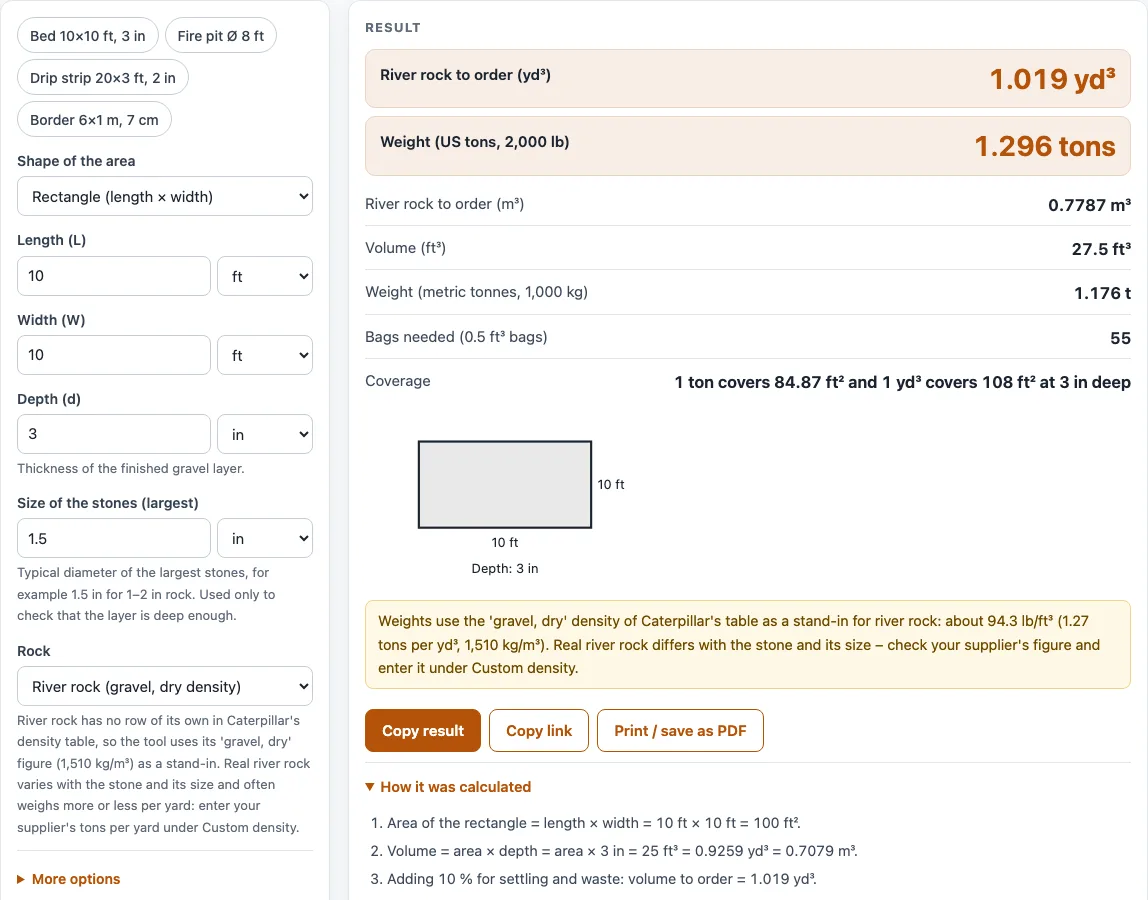
How to use the River rock calculator
- Choose the Shape of the area: Rectangle (length × width), Circle (diameter), Triangle (base × height) or Area already known.
- Fill in the boxes for your shape, each with a unit (ft, in, yd, m, cm or mm), or type the area directly.
- Enter the Depth (d) of the finished layer.
- Enter the Size of the stones (largest): for example 1.5 in for rock sold as 1–2 in. It is used only to check the depth.
- Leave the Rock at its starting value, or choose Custom density and type your supplier’s tons per cubic yard.
- Open More options to change Extra for settling and waste (%), which starts at 10, or to enter a Price per US ton, tonne, cubic yard or cubic meter.
- Read the results: the volume to order in cubic yards or cubic meters, the weight in tons or tonnes, the bag count, the coverage per ton and any depth warning. Then open How it was calculated to check each step with your numbers.
The example buttons (Bed 10×10 ft, Fire pit Ø 8 ft, Drip strip 20×3 ft, Border 6×1 m) load a complete calculation you can change. Reset restores the defaults, Copy link saves every input in the page address and Print / save as PDF prints your inputs, results, steps and the date.
How much river rock do I need?
Multiply the area by the depth to get the volume, then add an allowance for settling and gaps. For a 10 ft × 10 ft bed at 3 in deep the area is 100 ft² and the depth is a quarter of a foot, so the volume is 25 ft³, or 0.926 yd³. With the default 10 % extra it is 27.5 ft³, or 1.019 yd³. One cubic yard covers 162 ft² at 2 in, 108 ft² at 3 in and 81 ft² at 4 in, and the results show the coverage for your depth.
How many tons of river rock are in a yard?
River rock has no row of its own in Caterpillar’s density table, so the tool uses the dry gravel figure, 1,510 kg/m³ (94.3 lb/ft³), as a stand-in. That is about 1.27 US tons per cubic yard, and one ton covers about 85 ft² at 3 in deep and about 127 ft² at 2 in. For the 10 ft × 10 ft example the weight is about 1.30 US tons. Real river rock differs with the stone and its size, so ask your supplier for their tons per yard and type it under Custom density.
How deep should a layer of river rock be?
Deep enough that the stones sit in more than one layer. The tool checks your depth against the size of the largest stones. If the layer is thinner than the stones, it warns that the rock cannot lie flat. If the layer is less than twice the stone size, it warns that it is about one stone thick and the ground or fabric below may show through. For 1–2 in rock (1.5 in), the 3 in layer in the example passes both checks. The check is a prompt to ask your supplier or landscaper what depth they recommend, not a rule.
How do I cover a bed with 1–3 in or 2 in river rock?
Enter the size of the largest stones for the rock you buy (3 in for 1–3 in rock, 2 in for 2 in rock) and a depth at least twice that, then read the volume and the coverage. Larger stones need a deeper layer, so the same area takes more rock. Rock sold in bags is priced by the bag: the tool shows the bag count for 0.5 ft³ bags, and a bulk order by the yard or the ton is usually cheaper for a large bed.
Sources
- Caterpillar loose density table (gravel, dry 1,510 kg/m³, used as a stand-in for river rock), read October 2026
- QUIKRETE All-Purpose Gravel, 0.5 ft³ bag
Worked examples
| Input | Result |
|---|---|
| 10 ft × 10 ft, 3 in deep, stones about 1.5 in | 1.019 yd³ (0.7787 m³), 1.296 tons |
| Ø 8 ft, 3 in deep, stones about 1.5 in | 0.4887 yd³ (0.3736 m³), 0.6219 tons |
| 20 ft × 3 ft, 2 in deep, stones about 1 in | 0.4074 yd³ (0.3115 m³), 0.5185 tons |
| 6 m × 1 m, 7 cm deep, stones about 4 cm | 0.441 m³ (0.5768 yd³), 0.6659 t |
Calculated by the tool above with these values.
Frequently asked questions
Is the calculator free, and is anything I type uploaded?
Yes, it is free. It runs entirely in your browser, needs no sign-up, and nothing you type is uploaded.
How many bags of river rock do I need?
The tool divides the volume to order by 0.5 ft³ (14.2 L) and rounds up. For the 10 ft × 10 ft bed at 3 in with 10 % extra, that is 55 bags. Check the volume printed on the bag you buy and divide the volume to order by it.
How many square feet does a ton of river rock cover?
With the stand-in density, one US ton covers about 85 ft² at 3 in deep, 64 ft² at 4 in and 127 ft² at 2 in. Real figures vary with the stone, so use your supplier’s tons per yard under Custom density if you have it.
How much river rock do I need for a fire pit?
Choose the Fire pit button or enter the diameter of the circle. A circle 8 ft across at 3 in deep with 5 % extra is about 0.49 yd³, or about 0.62 US tons.
Is a river rock calculator the same as a rock cover calculator?
Yes. Rock cover calculator, river stone calculator and river rock stone calculator are different names for working out the volume and weight of rock for an area at a depth. For crushed stone, road base and other aggregates, use the stone calculator.
Can I use the results in commercial work such as quotes and bids?
Yes. The quantities, steps and printouts can be used in any work, including estimates, quotes, bids and material orders, and no attribution is needed. Confirm final quantities with your supplier before you order.
Related tools
- Stone calculator: use it for crushed stone, road base and other aggregates by tons and coverage.
- Gravel calculator: use it for gravel and pea gravel with bag counts.
- Cubic yards to tons calculator: use it to convert a volume into tons.
- Sand calculator: use it for dry and wet sand.
- Dirt calculator: use it for fill dirt and soil.
- All calculators: use it to browse every tool on the site.