Rise Over Run Calculator (Slope Percentage)
Enter rise and run, two elevations and a distance, a percent or an angle to get the slope in every common form.
How to use the slope percentage calculator
- Open the “I know” menu and choose what you already have: Rise and run, Slope percent (grade), Angle (degrees), Ratio 1:n, or Two elevations and the distance.
- For Rise and run, type the number in “Rise (vertical change)” and pick its unit: ft, in, yd, m, cm, or mm.
- Type the horizontal distance in “Run (horizontal distance)” and pick its unit. Rise and run can use different units.
- If you chose another option, fill in its field instead: “Slope (%)”, “Angle (°)”, or “Ratio 1 : n”. For two elevations, enter “Elevation at point A”, “Elevation at point B”, and the “Horizontal distance from A to B”, measured level and not along the slope.
- Read the result rows. Some appear only when an option is used, such as “Direction from A to B”.
- Check any warning shown under the result.
- Open “How it was calculated” to see each step with your own numbers.
To test the tool, press one of the example buttons above the form. Use “Copy result” to copy the result lines with a link, “Copy link” to copy a page address that reopens the same inputs, or “Print / save as PDF” to save the inputs, results, steps, and date. “Reset” restores the example values.
What is the rise over run formula?
The rise over run formula is slope = rise ÷ run. Rise is the vertical change between two points, and run is the horizontal distance between them, measured level and not along the slope. The result is a plain decimal with no unit, which is why you can express it as a percent, an angle, or a ratio. Both numbers must be in the same unit before you divide, so a rise in inches and a run in feet must be converted first. The tool does this conversion for you.
How do you calculate rise over run?
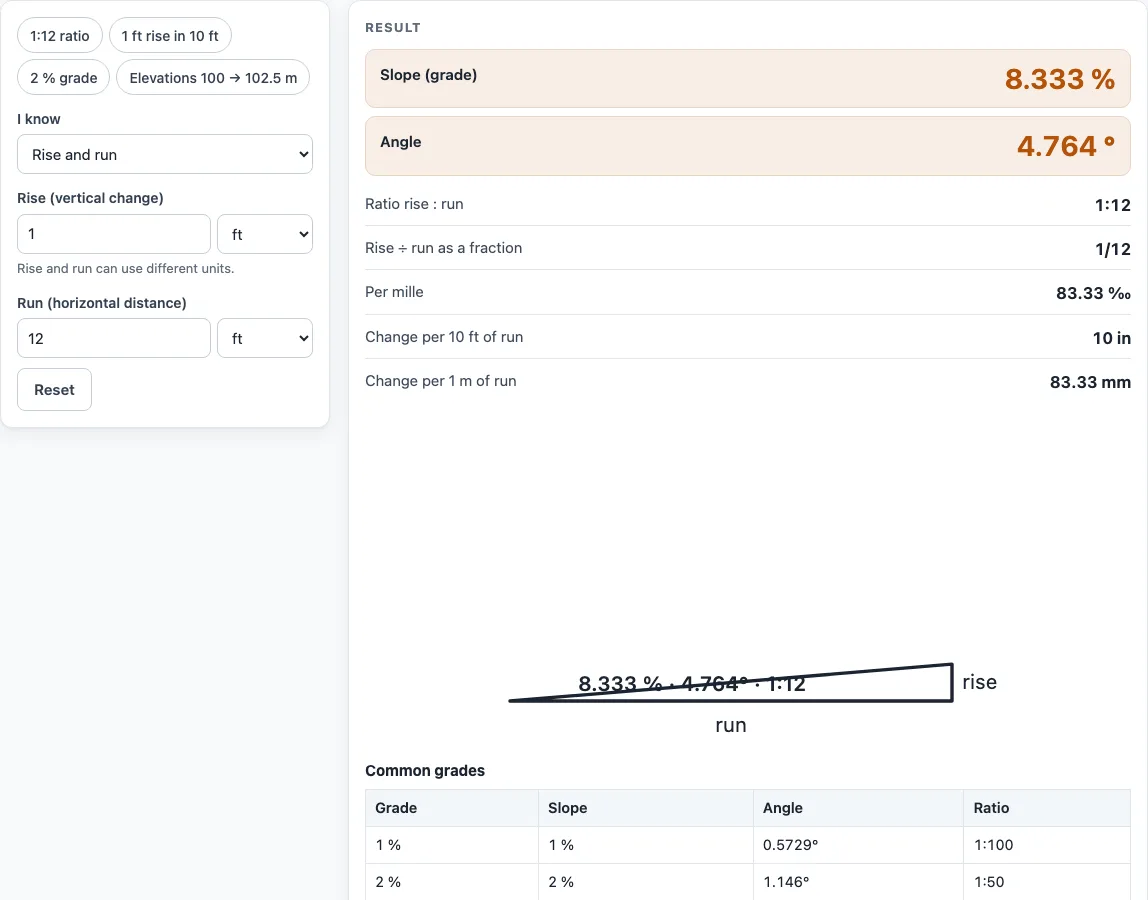
Divide the rise by the run to get the slope as a decimal, then multiply by 100 to get the slope percent. For example, a rise of 1 ft over a run of 12 ft gives 1 ÷ 12 = 0.08333. As a percent, that is 8.333%. The ratio 1:n uses the same division turned around: n = run ÷ rise. Here n = 12, so the slope is written 1:12, the ratio often quoted for ramps. If you have two elevations instead, the tool uses the absolute difference between them as the rise and tells you whether the ground rises or falls from A to B.
How do you convert slope percentage to degrees?
To convert a slope to degrees, take the arctangent of the rise divided by the run. In other words, angle = arctan(rise ÷ run). Start from the percent by dividing it by 100 first, so 5% becomes 0.05, and arctan(0.05) gives 2.862°.
A 45° angle is a slope of 100%, because rise and run are then equal. Slopes steeper than that have a percent above 100 and an angle above 45°. A 10° angle gives about 17.63%, which is a ratio of about 1:5.671, and a 1:12 slope gives about 8.33% at 4.76°. Percent and degrees describe the same slope, so the number you need depends on the drawing, code, or supplier you are working with.
Worked examples
| Input | Result |
|---|---|
| 1 ft / 12 ft | 8.333 %, 4.764°, 1:12 |
| 5 % | 5 %, 2.862°, 1:20 |
| 10° | 17.63 %, 10°, 1:5.671 |
| 1:20 | 5 %, 2.862°, 1:20 |
| 100 m → 102.5 m over 50 m | 5 %, 2.862°, 1:20 |
| 250 ft → 247 ft over 100 ft | 3 %, 1.718°, 1:33.33 |
Calculated by the tool above with these values.
Frequently asked questions
Is the calculator free, and is anything I type uploaded?
Yes, the calculator is free and needs no sign-up. It runs entirely in your browser, and nothing you type is uploaded.
Can I use the results in commercial work such as quotes and bids?
Yes. Results, steps, and printouts can be used in any work, including estimates, quotes, bids, and takeoffs. No attribution is needed.
What does the “Steeper than 45°” warning mean?
It means the slope is more than 100%, or steeper than 45°. Check that you typed the rise and run in the right fields and the right units, because a mix-up is a common cause of this warning.
What does the “The rise is zero” warning mean?
A rise of zero means the surface is level, so the slope is 0%. This is correct for a flat path, but if you expected a slope, check the rise value.
Do I need to convert units before I enter rise and run?
No. Rise and run can use different units, and the tool converts them before calculating. The results are a percent, an angle, and a ratio, so they do not depend on the unit you chose.
Are the results exact enough to use for building?
They are accurate arithmetic for planning, not an engineering design or a code check. Slope limits for ramps, drainage, or roofs depend on your local rules, so confirm them with your inspector or designer.
Related tools
- Roof pitch and slope calculator: use it when your slope is a roof and you need its pitch.
- Concrete step calculator: use it when you are planning stairs and need the rise and run of each step.
- Cut and fill calculator: use it when you are grading ground and need the volume of soil to move.
- Concrete slab calculator: use it when you are pouring a slab for a flat or sloped base.
- All calculators: use it to browse every tool on the site.
Sources
- OpenStax Precalculus, right-triangle trigonometry: slope, angle and pitch